The 6 Claude skills that run your Shopify store's SEO
Stop rewriting product pages one at a time. Six saved skills, and Claude runs the job across your whole catalogue against your real search data.
The AI SEO employee for founders
It fixes errors, writes your articles and optimizes your site for you.





4.8/5 · 500+ happy customers
« helped us to secure a multi year deal with a UK top 100 Law Firm »
Most store owners are using Claude wrong.
They open a chat, paste a product description, ask "make this better", copy it back into Shopify. One product at a time. For 200 products. That is not automation, that is a chatbot.
A skill is a set of instructions Claude loads on its own when it recognises the task. You build the workflow once, and from then on you name the job and it runs, against your real products, your real keywords, your real gaps.
The setup, once
Everything below depends on one thing: your AI has to see your real store and your real Search Console. Without both, Claude is a very articulate stranger guessing about your products.
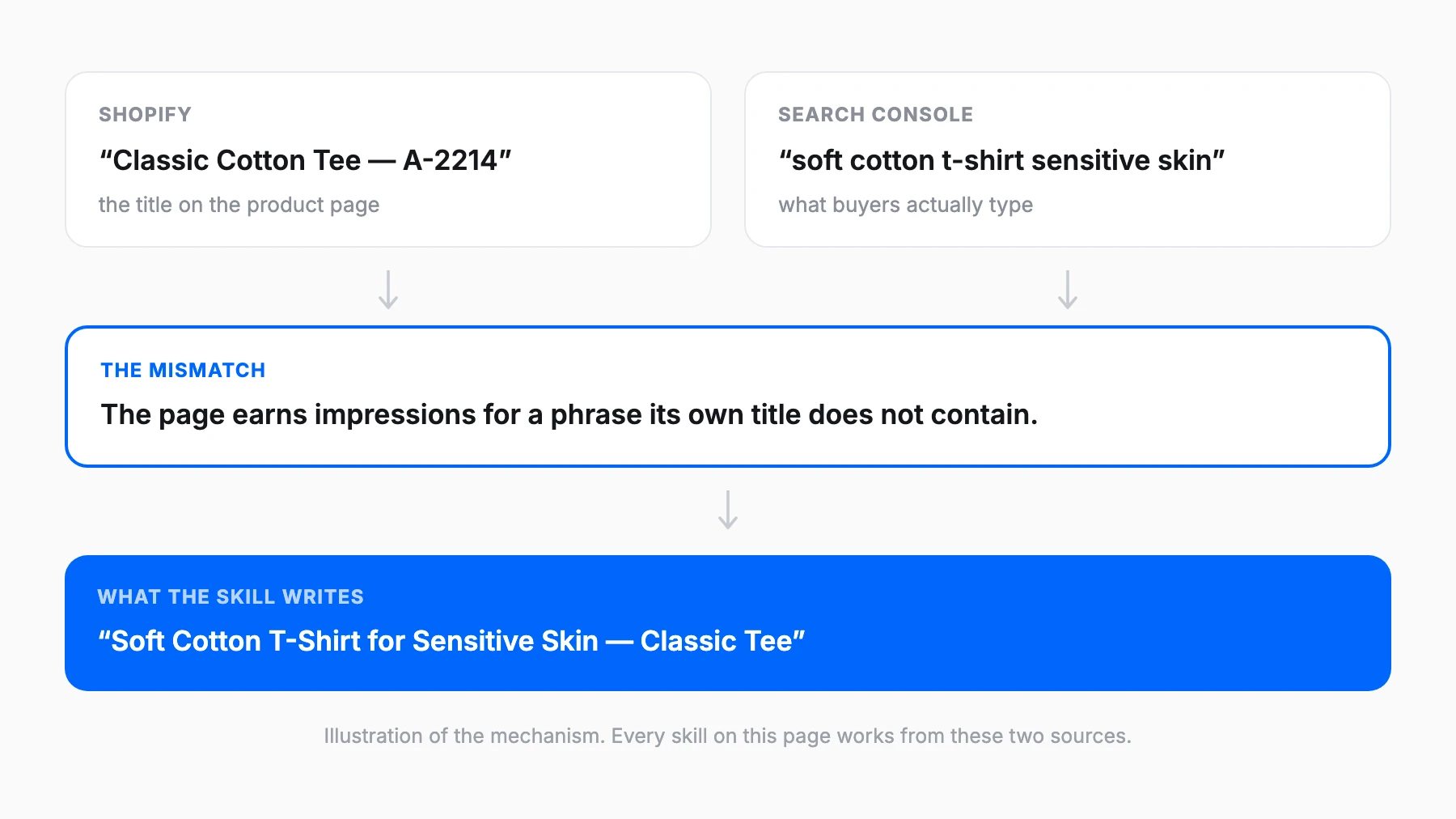
Shopify tells the agent what you sell. Search Console tells it what people actually search for. Connect one and you get generic e-commerce advice. Connect both and you get "this product ranks 7th for a query your title does not even contain."
- Create a free account, no credit card.
- Add your store, then connect Shopify and authorise it.
- Connect Google Search Console too, with the Google account that owns the property.
- Save each skill below as its own
SKILL.md, in its own folder.
From then on you describe the job and Claude loads the right one by itself.
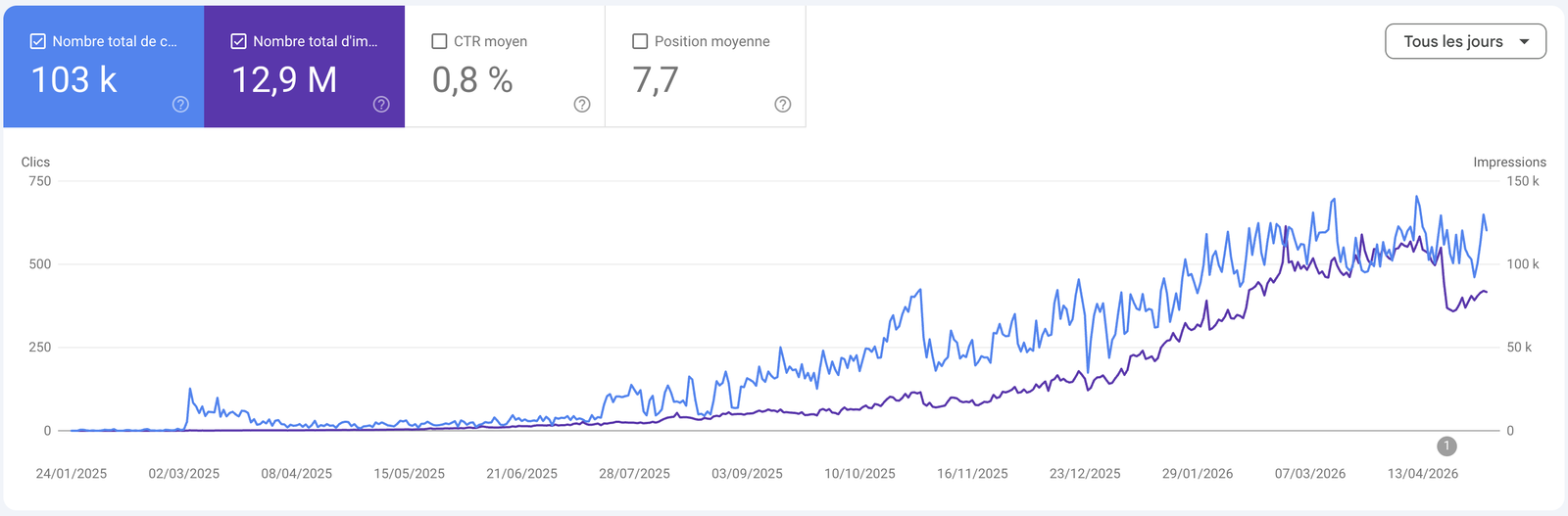
I even tripled my clicks on this site in 3 months. I use it almost every day on my various e-commerce stores and I recommend it 100%!Get results like Timothée
The 6 skills
Open the one you need, copy it, save it as its own SKILL.md. From then on you describe the job and Claude loads the right one by itself.
1Product page optimizerRewrites titles + descriptions for search, in bulk
- Run it with
- “optimize my product pages”
- When
- First. It's the only Skill that touches every page you already have
---
name: product-page-optimizer
description: Rewrite Shopify product titles and descriptions for search, in bulk, using live Search Console data. Use when the user wants to optimize product pages, fix product titles, or improve product descriptions.
---

# Product page optimizer

## What you do

1. Pull my product catalog from Shopify and the last 28 days from Search Console.
2. Match each product to the query it already earns impressions for. That query is the real product name - not the supplier's.
3. Score every product page on: title matches the real query, title is under 60 chars, description is unique (not the supplier's copy), description answers the top 3 questions a buyer has.
4. Rank by **impressions × how badly the page is mismatched**. A broken title on a page nobody sees is not worth my time.
5. For the top 20, write the new title (≤ 60 chars) and the new description (150-300 words, buyer-first, the real query in the first sentence).

## Output

A table: `product · top query · impressions · position · what's wrong`.
Then for the top 20: old title → new title, and the new description, ready to paste.
Then one line: how many of my products have duplicate supplier copy.

## Rules

- Write for the buyer, not for the crawler. If it reads like SEO copy, rewrite it.
- Never invent a spec, material, size or claim that isn't in my Shopify data. Wrong facts on a product page cost returns, not rankings.
- 20 products per run, max. A batch I can't paste in one sitting is a batch I'll abandon.
- If a product genuinely has no search demand, say so and skip it. Don't optimize a page into existence.
Connect my Shopify store
2Collection page builderWrites the intro content Google actually ranks
- Run it with
- “write my collection page content”
- When
- Right after the product pass. Collections are where the category-level traffic lives
---
name: collection-page-builder
description: Write ranking intro content for Shopify collection pages from live search data. Use when the user wants to improve collection pages, category pages, or add content to a collection.

---

# Collection page builder

## What you do

1. Pull my collections from Shopify and their query data from Search Console.
2. For each collection, find the head query it should own and the 3-5 buyer questions underneath it (sizing, materials, use case, price bands, how to choose).
3. Check what's already on the page. If there's real content, improve it - don't replace it.
4. Rank collections by **impressions ÷ words on page**. Highest demand with the emptiest page goes first.
5. For the top 5, write: a 60-100 word intro that sits above the grid, a 200-300 word buying guide that sits below it, and 3 FAQ entries.

## Output

A ranked list of collections: `collection · head query · impressions · current word count`.
Then for the top 5: the intro, the buying guide, and the FAQs - paste-ready.

## Rules

- Intro above the grid stays short. Nobody scrolls past 100 words to reach the products they came for.
- The long content goes **below** the grid. Never push products off the first screen.
- Write a real buying guide - how to choose between these products. Not 300 words of keyword padding.
- Five collections per run. If I have 40, we do this eight times, in demand order.
Connect my Shopify store
3Schema generatorProduct markup so you show up with price + stars
- Run it with
- “generate product schema for my store”
- When
- Once across the catalog, then whenever you add products
---
name: schema-generator
description: Generate and validate Product / Offer / AggregateRating JSON-LD for a Shopify store. Use when the user wants rich results, structured data, product schema, or stars and prices in search.

---

# Schema generator

## What you do

1. Pull my products from Shopify: price, currency, availability, SKU, GTIN/barcode, brand, reviews.
2. Check what schema my theme already outputs. Most Shopify themes ship partial `Product` markup - find the gaps instead of duplicating it.
3. Flag the three failures that actually kill rich results: price missing or mismatched with the page, `availability` stale, `AggregateRating` present with no visible reviews on the page (that's a manual action, not a warning).
4. Generate the missing JSON-LD: `Product` + `Offer` + `AggregateRating` where reviews genuinely exist, `BreadcrumbList` for the collection path.
5. Give me the theme edit: which `.liquid` file, and the block to paste.

## Output

**What's already there / What's missing / What's broken** - one line each, max 5 per list.
Then the JSON-LD block, using Liquid variables so it stays live as prices change.
Then the single file to edit and where in it.

## Rules

- Never output ratings for products with no reviews. Fake review markup gets a store penalized - this is a hard stop, not a preference.
- Use Liquid variables, never hardcoded prices. A hardcoded price is wrong within a week.
- If the theme already emits valid schema, say "already covered" and stop. Duplicate `Product` blocks are worse than none.
- One block to paste. Not a schema tutorial.
Connect my Shopify store
4Internal link fixerFinds orphan products, links them to collections
- Run it with
- “find my orphan products and fix the internal links”
- When
- Monthly. Every new product drop creates fresh orphans
---
name: internal-link-fixer
description: Find orphan Shopify products and prescribe the exact internal links to add. Use when the user asks about internal linking, orphan pages, or products that get no traffic.

---

# Internal link fixer

## What you do

1. Map my store from Shopify: every product, which collections it belongs to, what links to it from page content.
2. Find the **orphans** - products in zero collections, or reachable only from paginated grid page 4+.
3. Find my **authority pages** - the products and collections earning the most impressions in Search Console. That's the link equity I can redistribute.
4. Find the **strivers** - pages sitting in positions 5-20. Those are the ones a link actually moves.
5. Prescribe specific links: from page → to page, with the anchor text, drawn from the destination's real query.

## Output

**Orphans** - max 10, one line each: `product · why it's orphaned · the collection it belongs in`.
**Links to add** - max 15: `from → to · anchor`.
Then one sentence on what the orphans are costing me in missed impressions.

## Rules

- Anchor text comes from the destination's real query in my data. Never "click here", never the raw SKU.
- Don't link a product into a collection it doesn't belong in. A wrong collection hurts conversion more than the link helps ranking.
- Skip products that are out of stock permanently or discontinued. Those need redirects, not links - say so.
- 15 links per run. It's a manual job in Shopify and I have to actually do it.
Connect my Shopify store
5AI search auditorChecks if ChatGPT recommends your products
- Run it with
- “audit how AI assistants see my store”
- When
- Monthly. This channel is moving fast enough that quarterly is too slow
---
name: ai-search-auditor
description: Check whether AI assistants recommend this store's products, and prescribe the fix. Use when the user asks about AI search, LLM visibility, ChatGPT recommendations, or AEO/GEO.

---

# AI search auditor

## What you do

1. From my Shopify catalog and Search Console queries, build the 10 buyer prompts that matter - "best [category] for [use case]", "[category] under [price]", "[my brand] vs [competitor]".
2. Test each one and record: am I mentioned, in what position, and cited from which page.
3. When I'm absent, name the actual cause. There are only a few: no page answers that comparison, my product data is thin (no specs, no use case, no price context), I'm missing from the third-party listicles the models quote, or my content is copied supplier text with nothing unique to cite.
4. When a competitor gets recommended instead, find what the model quoted about them.
5. Give me the fix ranked by effort, and separate what I can do on my own store from what needs someone else's page.

## Output

A table: `prompt · mentioned? · position · source cited · who won instead`.
**Why I'm missing** - max 3 causes, each with the specific page or field to change.
**This month's one fix** - the single highest-leverage change.

## Rules

- Report what actually came back, including "not mentioned anywhere". A flattering audit is a useless audit.
- Assistants quote pages with specifics - materials, dimensions, use cases, comparisons. "Improve your brand presence" is not a fix. Name the field.
- Don't recommend anything that involves gaming or spamming a third-party site.
- One fix per month. This channel rewards being genuinely the best answer, and that takes more than a sprint.
Connect my Shopify store
6Competitor gap finderKeywords your rivals rank for and you don't
- Run it with
- “find my competitor keyword gaps”
- When
- Quarterly, or when you're deciding which collection to build next
---
name: competitor-gap-finder
description: Compare this store's rankings against competitors and surface winnable keyword gaps. Use when the user asks about competitors, keyword gaps, or what to publish next.

---

# Competitor gap finder

## What I'll give you

My 2-3 main competitor domains. Pull everything else yourself.

## What you do

1. Pull my live Search Console (last 90 days) for where I actually rank, and my Shopify catalog for what I actually sell.
2. Pull the keyword data for each competitor domain.
3. Build three buckets:

- **Missing** - they rank top 10, I don't rank at all.
- **Losing** - we both rank, they're above me. The winnable ones.
- **Winning** - I'm above them. Keep this: defending a lead is cheaper than taking one.

4. **Filter against my catalog.** A keyword for a product I don't stock is not a gap, it's a merchandising decision - list those separately, max 3, and move on.
5. Rank what's left by `search volume × how realistically I can win it`, using my existing positions as the difficulty signal.
6. For each gap, say which page type wins it: an existing product, a new collection, or a buying guide.

## Output

A side-by-side table for the top 10 gaps:
`keyword · volume · my position · their best · page type · verdict (optimize <page> / build collection / skip)`.
Then: **The 3 to go after**, one line each on why and which page does it.
Then: **Products they sell and I don't** - max 3, flagged as a buying decision, not an SEO one.

## Rules

- Prefer optimizing a page I have over building a new one. Name the page.
- A collection page beats a blog post for commercial intent almost every time. Only recommend a guide for genuine research queries.
- No third-party keyword-difficulty scores. Use my real positions.
- Ten gaps. Not fifty. I will not read fifty.
Connect my Shopify store
The routine
Six skills is not six jobs a week.
Week one. Run the product page optimizer across the catalogue, then the collection page builder. That is the pass that touches every page you already have.
Week two. Schema, then internal links. Both are one-off structural fixes that keep paying.
Monthly. Re-run the product optimizer on anything new, and the competitor gap finder.
Quarterly. The AI search auditor, to see whether assistants still recommend you.
Do not set up all six this week. Set up two, run them for a month, add the rest when those two feel automatic.
The four mistakes that kill this
- Going back to copy-paste "just this once": the moment you paste one product, Claude is back to guessing about the other 199 - Letting a skill return a list instead of doing the job, which rebuilds the dashboard you were escaping - Running all six every week, so you spend an hour reading and zero minutes shipping - Not saving them as files: retyping the prompt each time means slightly different wording and nothing comparable month to month
Where it still needs you
The skills do the pulling, the ranking and the drafting. These calls stay yours.
- The description has to be true. Claude will write a better-performing product description. It will not know if it oversells what is in the box.
- What to stock next is a business decision. The gap finder shows the demand; only you know if it is demand you want.
- Judgment on the weird stuff. If a number looks wrong, it might be. Go and look.
If you do nothing else
Your catalogue already ranks for queries your titles do not contain. Search Console has been saying so for months.
- Connect Shopify and Search Console. Five minutes, free.
- Run the product page optimizer tonight, on your ten worst performers.
- Put the collection page builder in your calendar for next week.