Turn Claude into your SEO team: the one-click ChatSEO connector
Connect Claude to your real Search Console data and your CMS, and it stops giving SEO advice and starts doing the work.
The AI SEO employee for founders
It fixes errors, writes your articles and optimizes your site for you.





4.8/5 · 500+ happy customers
« helped us to secure a multi year deal with a UK top 100 Law Firm »
Ask Claude an SEO question today and you get a good answer about SEO in general. Ask it about your site and it guesses, because it has never seen your Search Console.
That gap is the whole reason this connector exists. Below is what changes once Claude can read your real data and write to your real site, plus the prompts we actually use. All of them are real and none of them are gated.
What the connector actually is
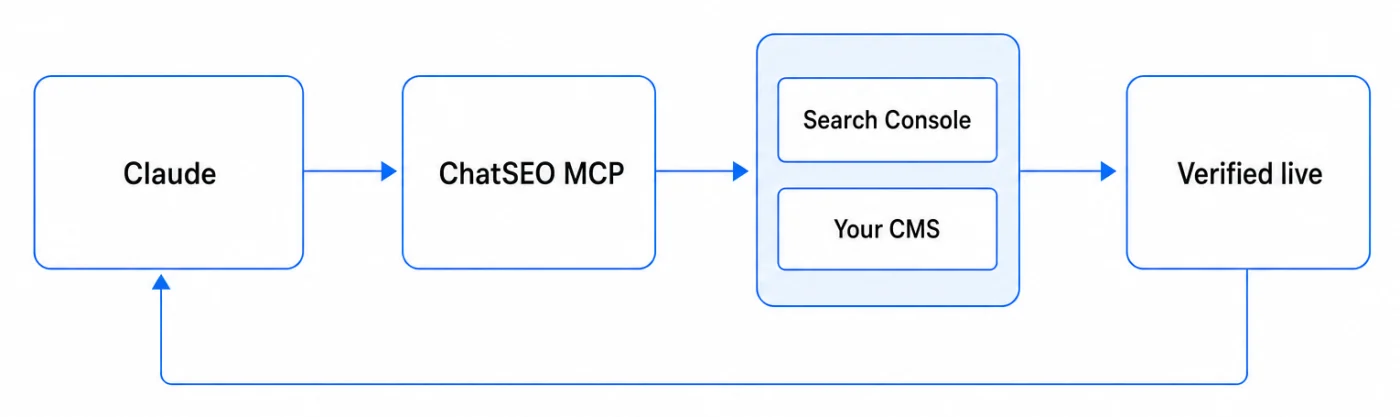
ChatSEO exposes an MCP server. Claude speaks MCP. Connecting the two takes one click and no configuration file.
Once connected, Claude gains three things it did not have:
- Read access to your Search Console through your ChatSEO account: queries, impressions, clicks, positions, over any window you ask for.
- Read access to your site's structure: your pages, your sitemap, what each page is currently trying to rank for.
- Write access to your CMS, if you connect WordPress or Shopify: it can push the change and then check that it went live.
Everything below runs from your normal Claude chat. There is no second app to learn.
1. Find high-impact opportunities from your real Search Console data
This is the first thing to do after connecting, and it is the one that surprises people, because the answer is almost never the page they expected.
Three patterns are worth more than everything else combined:
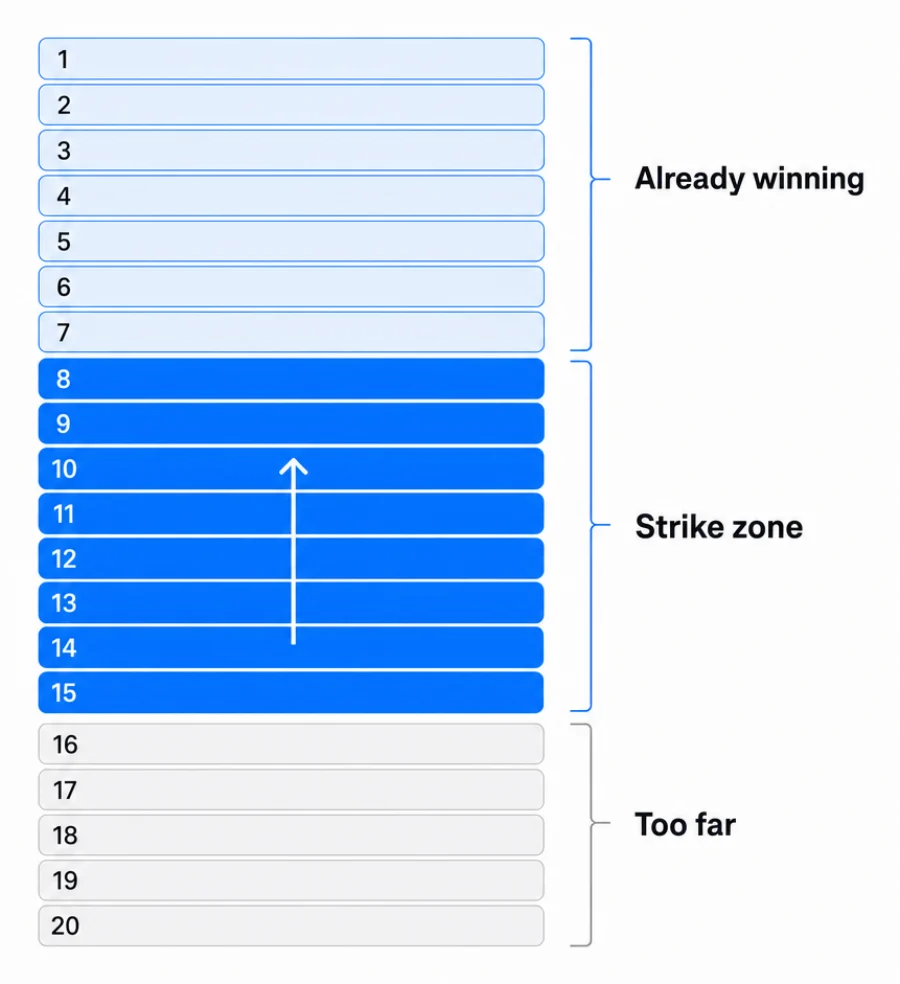
Positions 8 to 15. A page sitting at 11 gets a rounding error of the clicks a page at 5 gets. It is already relevant enough for Google to rank it on the edge of page one. Moving it four places is a smaller job than creating anything new, and the traffic difference is not linear, it is a cliff.
High impressions, low CTR. Google shows the page, people see it, nobody clicks. The page is fine. The title and description are doing the losing. This is the cheapest fix in SEO and the most commonly skipped.
Keywords losing ground. A query where you dropped over the last month tells you something changed: a competitor moved, or the page stopped answering what people now mean by that query.
Find the strike zone
Using my Search Console data for the last 28 days, list every query where my
site ranks between position 8 and 15 with at least 100 impressions.

For each one give me: the query, the page that ranks, the exact position,
impressions, clicks, and CTR.

Sort by impressions, descending. Return the top 15 as a table and nothing else.

If a figure is not in the data, say "cannot compute from this data" - do not
estimate it. Do not list alternatives or suggest what to do next.
Connect Claude to my site
Two details in that prompt do real work. Do not list alternatives stops Claude from turning a data pull into a strategy essay. The line about not estimating matters more than it looks: without it, a model asked for CTR on a query with sparse data will happily produce a plausible number.
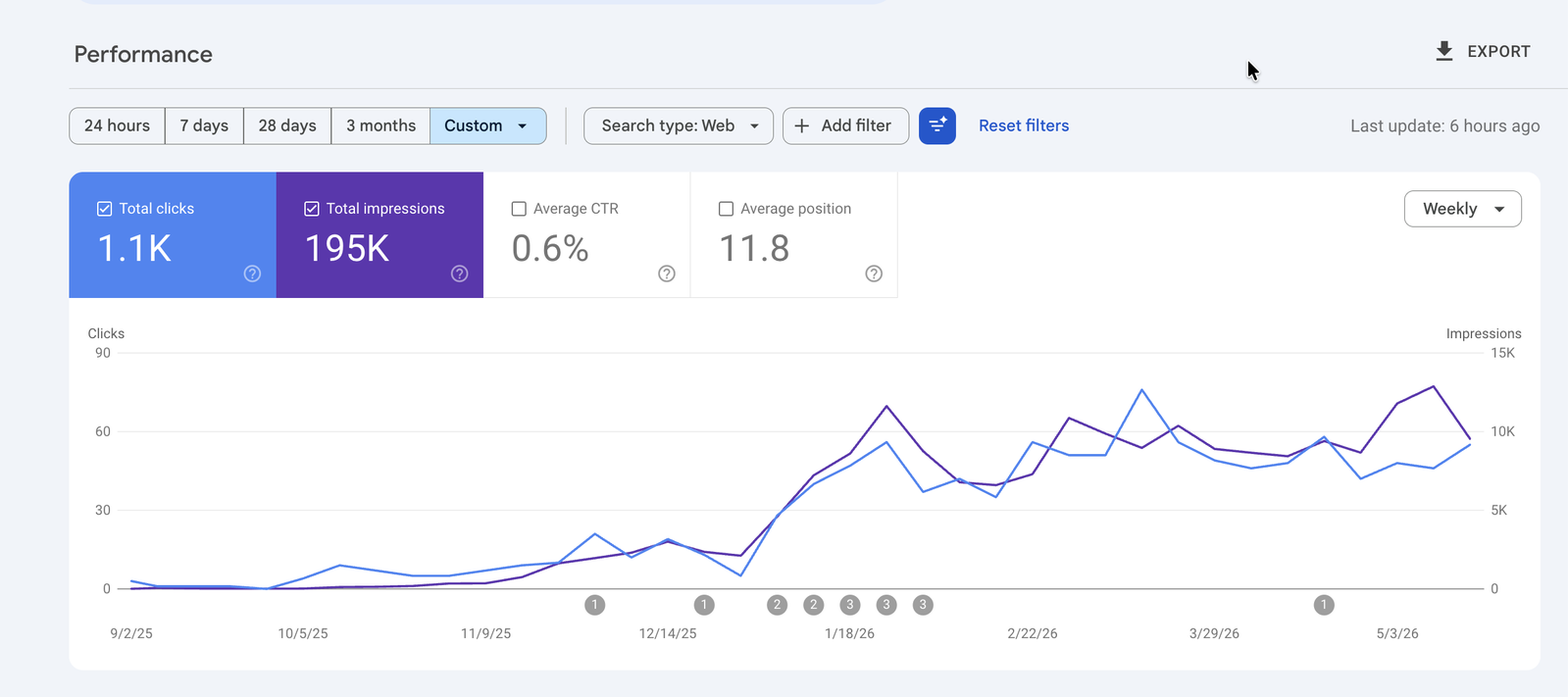
Clicks and Impressions are up 46% since I started using ChatSEO. Up 46% in the last 3 months!Get results like Daniel
2. Surface the best quick wins from a simple prompt
The strike-zone list tells you where you are close. It does not tell you what to do first. That is a different question, and it is worth asking in plain language rather than building a scoring spreadsheet.
What should I fix first
Which of my pages lost the most clicks in the last 28 days compared with the
28 days before that?

For each page, show: URL, clicks before, clicks after, the difference, and the
single query responsible for most of the drop.

Give me the top 5, then pick ONE to fix first and say why in two sentences.
Do not give me three options.
Connect Claude to my site
Do not give me three options is the whole point. A prompt that ends in a menu produces another decision for you to make. A prompt that ends in one action produces work.
3. Research any keyword or competitor without leaving the chat
Normal keyword research means Search Console in one tab, a keyword tool in another, the SERP in a third, your CMS in a fourth, and a spreadsheet to hold the mess together.
With the connector, you give Claude a keyword and it pulls the data, checks who currently ranks, and tells you what those pages have that yours does not.
The useful version of this question is comparative, never absolute. "Is this keyword good" has no answer. "Can I realistically beat the pages that rank for it" does.
Can I win this keyword
For the keyword "<your keyword>":

1. Pull the search volume and difficulty.
2. List the pages currently ranking in the top 10, with their domain.
3. For each, say in one line what kind of page it is (guide, product, comparison, forum).
4. Tell me whether my site already has a page targeting this, and if so, where it ranks.
5. End with a single verdict: realistic in under 3 months, realistic in 6 to 12, or not worth it.

If you cannot load a URL, say so and ask me for it rather than assuming what
is on the page. Do not invent metrics.
Connect Claude to my site
That last instruction is not paranoia. A model that cannot fetch a page will describe it anyway if you let it, and the description will sound exactly as confident as a real one.
4. Rewrite titles, descriptions and content against your actual search data
This is where most AI SEO output falls apart. Ask any model to write a meta description and you get something fluent and generic, because it is writing for the topic rather than for the query that actually brings you impressions.
Connected, Claude writes against the real query. It knows the page is showing up for a phrasing you never targeted, and it can put that phrasing where it belongs.
Rewrite for the query that actually converts
Take the page <URL>.

1. Pull its top 5 queries by impressions from Search Console, with CTR for each.
2. Show me the current title and meta description.
3. Rewrite both so they lead with the highest-impression query that the current
 title does not contain.

Keep the title under 60 characters and the description under 155.
Give me ONE version of each, not variations.
Do not invent numbers or claims that are not on the page.
Connect Claude to my site
5. Execute the fix on your site, then verify it went live
Everything above still ends with you copying text into your CMS. That is the step where SEO work quietly dies, because it is the step nobody schedules.
If you connect WordPress or Shopify, Claude closes it. It applies the change and then re-reads the live page to confirm the new title is really there.
The verification matters more than the write. A CMS can accept an update and still serve the old value from cache, or an SEO plugin can override the title you just set. A change you believe landed but did not is worse than no change at all, because you will attribute the flat result to the idea rather than to the plumbing.
Apply and confirm
Apply the title and meta description you just wrote to <URL> on my site.

Then fetch the live page again and show me the title and meta description as
they are actually served, so I can confirm the change is live.

If the served values do not match what you wrote, tell me exactly what differs
and stop. Do not retry silently.
Connect Claude to my site
Do not retry silently is there because a retry that works on the second attempt hides a real problem: something on the site is fighting the update, and you want to know that now rather than in a month.
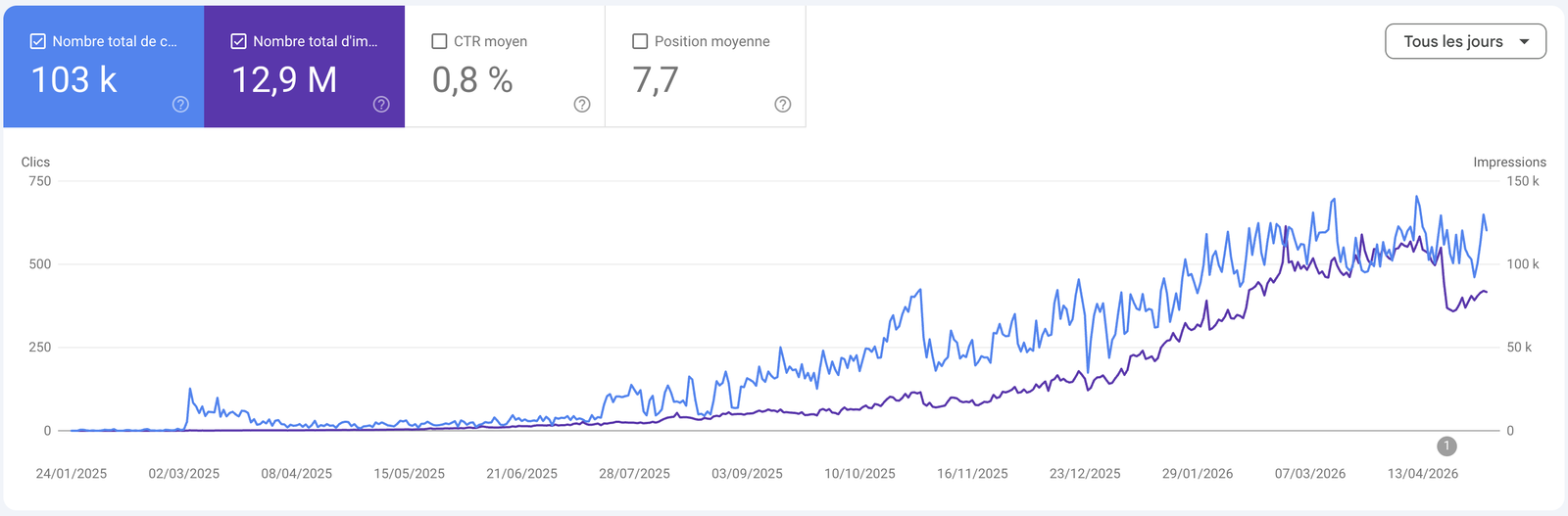
I even tripled my clicks on this site in 3 months. I use it almost every day on my various e-commerce stores and I recommend it 100%!Get results like Timothée
6. Run scheduled SEO tasks so the work continues
SEO fails on consistency, not on knowledge. Everyone knows to check their positions. Almost nobody does it on a Tuesday in the eleventh week.
Scheduled tasks move the checking off your plate: a weekly pull of what moved, a monthly look at pages sliding out of the strike zone, an alert when a page that was ranking drops off.
The rule that makes this survivable is that a schedule should produce a decision or nothing at all. A recurring report that always fires trains you to ignore it. A schedule that only speaks when a page crosses a threshold keeps its meaning.
7. Ask questions about your SEO in plain English
The last one is the least impressive to describe and the one you will use most.
- "Which keywords gained positions this week?"
- "Which pages should I update first?"
- "Did that fix actually improve CTR?"
That third question is the one no dashboard answers well, because it requires remembering what you changed and when, then comparing the right two windows. Connected, it is one sentence.
The honest gap
Here is what the connector does not do, and you will hit it within a week.
Claude is stateless between conversations. Each new chat starts from zero: it does not remember that you rewrote that pricing page last Tuesday, that you already decided the blog category was not worth pursuing, or that a fix from three weeks ago is now due for a result check. You will re-explain your site, or you will paste yesterday's context back in.
That is not a flaw in Claude, it is what a chat is. But it means the loop stays open. Something has to hold the site profile, the queue of what was decided, and the verification that a change from two weeks ago actually moved a number.
That is the part ChatSEO does on its own side: it keeps the site profile, it tracks each action through to its measured result, and it checks back without being asked. The connector gives you Claude's reasoning on your data. The product is what remembers between the conversations.
The mistakes worth avoiding
- Asking for a strategy before pulling the data, which produces a plausible plan for a site nobody looked at - Letting a prompt end in three options, so the work becomes another decision - Rewriting a page that ranks 40th instead of one that ranks 11th - Applying a change without re-reading the live page - Scheduling a recurring report that fires whether or not anything happened - Believing a number a model produced without a source, because it was formatted like a real one
What this replaces
- Search Console in one tab, a keyword tool in another, the SERP in a third
- Export to CSV, then paste into a model that cannot see the rows you left out
- Generic AI copy written for the topic, not for the query you rank on
- Copy the new title by hand into the CMS, and hope it took
- Check back when you remember, which is rarely
- One chat that reads your live Search Console
- Claude works on the full dataset, not on what fitted in a paste
- Copy written against the query that already brings impressions
- The fix applied to WordPress or Shopify, then verified on the live page
- Scheduled checks that only speak when something actually moved